Personalized Dog Wallpaper Ideas for Your Phone
Bring your dog's unique personality to your mobile lock screen with custom quote art, cinematic layouts, and clear widget placement.
🐾 Free: what would your dog say about you?
Answer 6 questions →A personalized dog wallpaper turns your phone’s lock screen into a daily touchstone, featuring the specific quirks only you notice—like the way your dog rests their chin on your knee during video calls or claims the sunny spot on the rug at precisely two in the afternoon. Creating a high-quality display requires matching your photo or quote to your phone screen resolution while keeping visual details clear of the clock and notification area. Whether you want a funny caption written from your pet’s perspective, an elegant silhouette, or dramatic movie poster artwork, thoughtful digital design keeps your best companion front and center throughout your day.
Short answer: Creating a personalized dog wallpaper requires choosing a layout that keeps key artwork away from your lock screen clock, using high-resolution images, and picking a style—such as custom quote typography, movie poster art, or minimalist vector illustration—that captures your dog’s exact everyday personality without cluttering your digital display.
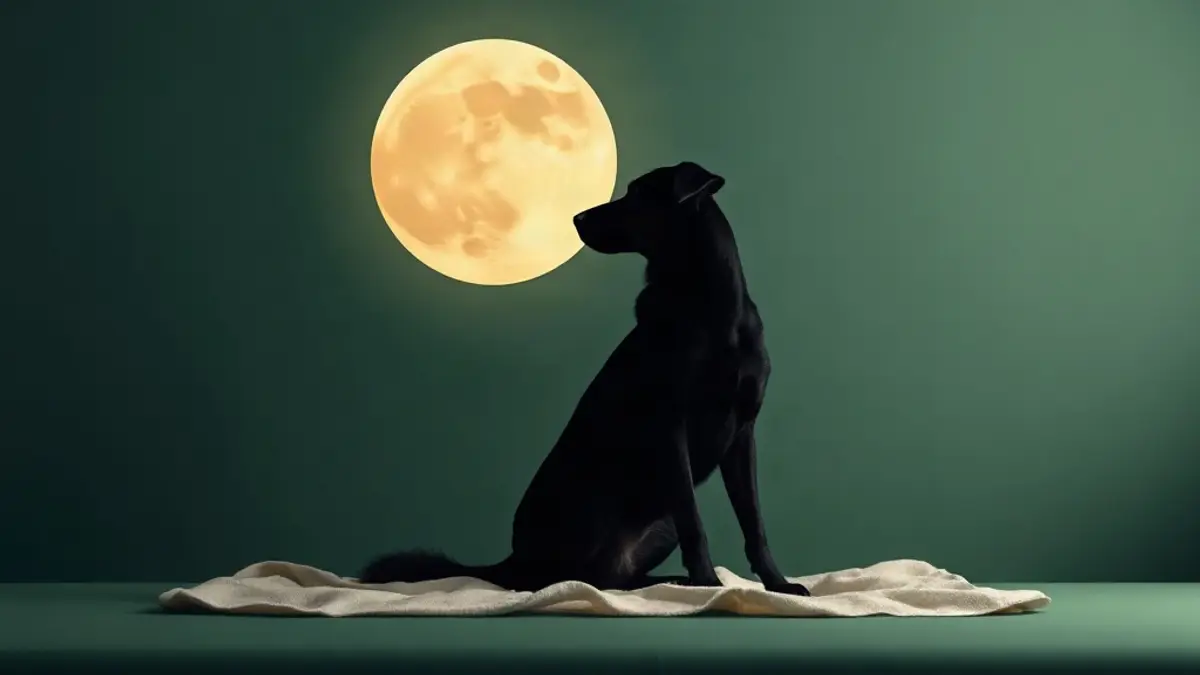
Choosing the Right Style for Your Personalized Dog Wallpaper
When designing a personalized dog wallpaper, the goal is to translate your dog’s distinct personality into a clean visual format. Every dog brings a different energy to a home. A quiet senior dog who sleeps against the hallway baseboards demands a different visual style than an energetic young terrier who inspects every grocery bag you bring through the door.
Selecting a background style comes down to how you interact with your phone and what kind of moment you want to experience every time you tap your screen. Some owners prefer a playful dog quote wallpaper that highlights an internal monologue, while others prefer dramatic photography framed like a theatrical release. Minimalist line drawings offer a subtle touch, whereas high-contrast photo cutouts bring maximum energy.
| Wallpaper Style | Best For | Typical Composition | Layout Considerations |
|---|---|---|---|
| Dog Quote Typography | Humor & Daily Smiles | Short text in dog’s voice with photo background | Keep text positioned in the lower third |
| Cinematic Movie Poster | Playful, Dramatic Pets | Centered full-body photo with styled titles | Align hero art below screen clock widgets |
| Minimalist Vector Art | Clean & Subtle Displays | Single line art silhouette on solid color | High contrast works best with dark mode |
| Dog Photo Cutout | High Energy Action Shots | Subject isolated from background on soft hue | Requires clean edge cutout around fur |
| Multi-Photo Grid | Dogs With Many Quirks | Grid of three to four candid everyday photos | Keep grid margins wide to prevent edge crop |
Selecting the right composition ensures your custom dog phone wallpaper remains legible, attractive, and functional across daily use.
Custom Dog Phone Wallpaper Ideas in Your Dog’s Voice
One of the most engaging ways to personalize a mobile display is to write short typography captions from your dog’s perspective. Framing these thoughts is a playful way to read your pet’s everyday actions, translating familiar habits into tiny monologues. Many owners notice that capturing these micro-moments creates a far more emotional connection than a standard studio portrait.
To make a personalized pet phone wallpaper feel real, focus on concrete daily routines rather than generic phrases. Think about the specific habits that make your dog who they are:
- The way they stand by the kitchen counter while you chop carrots, waiting for an accidental drop.
- Their ritual of turning three full circles before settling into a pile of clean laundry.
- The specific grunt they make when you sit down on the couch without offering an immediate belly rub.
- The sudden burst of energy that occurs precisely five minutes before their scheduled dinner time.
When adding text to your custom dog lock screen, keep the phrasing short and direct. A line like, “I saw you leave without me, but I saved your favorite shoe,” captures character immediately. You can explore a wider collection of humorous lines in our guide to dog quotes from a dog’s perspective, which offers phrasing ideas tailored to various dog personalities.
Formatting Quote Typography for Mobile Screens
When adding text to mobile graphics, font choice and alignment dictate readability. Use bold, sans-serif typefaces for light backgrounds, or soft white serif fonts if your image features dark tones. Position text blocks within the lower third of the display. This placement prevents your clock, battery icon, and notification cards from overlapping the words.
Movie Poster Art as a Lock Screen Display
If your dog carries themselves with dramatic flare, transforming their photo into full theatrical poster art creates an unforgettable mobile display. Dogs naturally step into hero roles in our daily lives, whether they are guarding the front yard from passing squirrels or heroically hunting down lost tennis balls under the sofa. Drawing inspiration from the history of film posters, you can build a composition that uses cinematic typography, dramatic lighting, and playful film credits.
To create a dog wallpaper from photo assets in a movie poster style, choose a picture where your dog is looking slightly off-camera or posing with strong posture. A photo taken from a low angle—looking up at your dog—gives them a heroic silhouette ideal for an action blockbuster layout. Alternatively, a close-up photo with dramatic side lighting works perfectly for a noir detective theme.
If you want to explore dedicated layout styles, our guide on turning your dog into a movie poster breaks down graphic design arrangements for genres ranging from westerns to epic fantasy quests. For a pre-designed collection of themes ready for mobile customization, you can also look into the Dog Movie Poster Pack™, which provides structured graphic templates.
Movie Poster Theme Concepts for Different Breeds
- The Backyard Detective: Perfect for hounds and terriers who spend hours sniffing fence lines. Use muted vintage tones, subtle shadow effects, and titles like The Case of the Missing Squeaker.
- The Space Explorer: Ideal for dogs who stare intently at the ceiling fan or bounce effortlessly off furniture. Set your dog against dark cosmos backgrounds with glowing title typography.
- The Wild Wilderness Scout: Great for golden retrievers, labradors, and hiking companions. Use warm golden-hour lighting, forest backdrops, and rustic title fonts.
- The Royal Monarch: Suited for pugs, French bulldogs, or lap dogs who insist on sleeping on the highest pillow in the house. Frame your pet with regal borders, rich velvet textures, and gold lettering.
Minimalist Silhouettes and Vector Line Art
Not every phone background needs busy imagery or dramatic lighting. Minimalist line art offers a sophisticated option for dog owners who want a clean visual layout that pairs nicely with minimalist app icons and simple widgets. Vector silhouettes reduce your dog’s distinct outline to a simple, elegant drawing.
To create line art from a photo, graphic tools trace the contour of your dog’s ears, nose, and body profile. Breeds with distinct features—such as the upright ears of a German shepherd, the floppy ears of a basset hound, or the fluffy tail curl of a samoyed—translate exceptionally well into vector illustrations.
Using a single solid accent color for the line art against a dark slate, warm taupe, or deep forest green background keeps your phone screen calm. Minimalist designs also reduce visual noise, making it easier to spot app labels and unread notifications at a quick glance.
Sizing and Resolution Tips for Common Phone Displays
One of the most common issues when setting a custom dog phone wallpaper is accidental cropping. Mobile display aspect ratios vary widely across manufacturers. An image scaled for a standard widescreen screen may cut off your dog’s ears or crowd your caption against screen margins when applied to a taller phone screen.
To ensure your image looks crisp without distortion, design your graphics according to standard mobile display aspect ratios:
- Taller Modern Displays (19.5:9 ratio): Target a resolution of 1179 x 2556 pixels. This fits most modern flagship smartphones.
- Standard Displays (16:9 ratio): Target a resolution of 1080 x 1920 pixels for older model smartphones or standard media displays.
- Tablet Displays (4:3 ratio): Target a resolution of 2048 x 2732 pixels if you plan to share your personalized design across larger devices.
Step-by-Step Guide to Scaling Your Image Correctly
- Measure the Canvas: Open your graphic editor and set your canvas dimensions to match your target phone’s exact pixel resolution before adding photos.
- Import High-Resolution Photos: Avoid using compressed images downloaded from messaging apps. Source original photo files directly from your camera roll.
- Establish Safe Zones: Leave roughly 25 percent of clear space at the top of the canvas for the clock and upper widgets, and 15 percent at the bottom for navigation bars.
- Center Subject Focus: Position your dog’s eye level within the vertical middle third of the screen canvas.
- Export Uncompressed Files: Save your finished file as a high-quality PNG or uncompressed JPEG to avoid color banding and pixelation.
Taking time to format your image prevents automatic OS wallpaper fit features from zooming in and cropping out vital artistic details.
Discover What Your Dog Would Say About You
Before finalizing the quotes and captions for your custom phone wallpaper, it helps to spend a moment reflecting on how your dog sees your shared life. If you want a playful jump-start on writing your dog’s internal dialogue, try the free six-question experience. By answering six quick questions about your dog’s funny daily habits, favorite nap spots, and happiest moments, you will receive a personalized digital reflection showing what your dog might say about you. It takes about a minute, is completely free, and requires no account signup.
Keeping Text and Subject Artwork Clear of Clock Area and Widgets
Modern smartphone operating systems use bold clock overlays, depth-of-field visual effects, and customizable desktop widgets. While these features make your lock screen useful, they can obscure key elements of your personalized pet phone wallpaper if you do not plan your layout carefully.
When setting up your design, keep these practical layout rules in mind:
- Lower the Focal Point: Place your dog’s head and eyes below the top 30 percent mark of the screen frame.
- Utilize Negative Space: Leave empty sky, plain walls, or solid blurred background colors behind the upper clock region.
- Account for Notifications: Remember that incoming text cards and app alerts stack from the bottom upwards or occupy the center screen space.
- Test Depth Effects: If using system depth settings that place your dog slightly in front of the clock numbers, ensure the clock remains readable.
- Avoid Busy Patterns Behind Icons: If applying the design as a home screen background, choose low-contrast backgrounds so app text remains legible.
Checking these layout choices prevents key graphic details from being blocked by dynamic lock screen overlays.
Privacy Note: Avoid Private Details on Your Lock Screen
Personalizing a lock screen allows for creative expression, but privacy should always remain a top priority. Your phone screen frequently lights up on restaurant tables, office desks, and public counters where strangers can view display text.
Avoid placing highly sensitive information directly on lock screen graphics. Private details to exclude from public lock screens include:
- Your home physical street address or apartment number.
- Full legal names, personal phone numbers, or security codes.
- Microchip registration numbers or vet medical account numbers.
- Workplace schedules or detailed travel itineraries.
If you want to include emergency owner contact details on your lock screen in case your phone is misplaced, list a secondary contact number or a simple email address written in a small font near the bottom edge. Keep personal anecdotes focused strictly on lighthearted, general habits.
Dog Mom Wallpaper and Dog Dad Wallpaper Themes
Designing custom mobile backgrounds is a popular choice for pet parents seeking a thoughtful gift or personal keepsake. A dog mom wallpaper often incorporates soft color palettes, gentle hand-lettered fonts, and warm candid photography taken during daily walks or morning coffee routines. These designs celebrate small everyday moments, like sharing a morning spot on the couch or walking through autumn leaves.
For a dog dad wallpaper, designs frequently lean into clean graphic layouts, bold typography, or outdoor adventure themes. A photo of a dog sitting proudly in the back of an SUV or waiting patiently by a garage workbench serves as an ideal foundation. Adding short, humorous captions about shared chores or lawn supervision adds personality without cluttering the screen visual.
If you are searching for physical and digital presents tailored to pet parents, explore our guide to personalized dog mom gift ideas or browse our curated collection of digital gifts for dog lovers for flexible, shipping-free inspiration.
Turning Your Dog’s Story Into a Personal Keepsake
While a phone wallpaper keeps your pet visible with every screen unlock, pairing your mobile design with a written keepsake deepens the story. A digital display captures a single photo or quote, but a full letter captures the entire scope of your relationship—from daily apartment routines to the unspoken trust built over years together.
If you want to turn those everyday moments into something permanent, Letter From My Dog™ ($7, one-time) creates a custom written letter expressed from your dog’s perspective. Created from the specific details you share about your dog’s life, each digital keepsake package includes a full personalized letter, Our Bond Story, a list titled 10 Little Things Your Dog Probably Loves About Life With You, printable PDF formats, an Instagram story share card, and a matching mobile phone wallpaper. Everything is generated after purchase, offering a complete set of digital keepsakes without subscriptions or shipping waits.
For readers who want to explore broader storytelling options, you can also consider a personalized digital dog storybook ($19) for an illustrated narrative, or expand your wallpaper collection with a Dog Movie Poster Pack™ ($4).
Connecting Printable Keepsakes to Mobile Backgrounds
Many dog owners enjoy matching their mobile backgrounds with physical prints displayed around their homes. Using cohesive artwork across both physical framing and digital devices creates a unified aesthetic that celebrates your companion.
For example, if you print a written story or personalized letter to hang in your entryway or office, you can extract key quotes or matching background colors to use on your phone’s lock screen. If you prefer framing physical documents at home, our guide to creating a printable letter from your dog details paper selection, sizing recommendations, and framing tips for home displays.
By carrying the same visual theme from your living room wall to your smartphone display, your pet’s presence stays integrated into your daily environment both at home and on the go.
Frequently Asked Questions
How do I make a custom dog lock screen for my phone?
To make a custom dog lock screen, select a high-resolution photo of your dog and open it in a graphics editor set to your phone’s screen resolution (such as 1179 x 2556 pixels). Position your dog’s head in the middle third of the canvas to avoid overlapping the clock. Add text or filters, save the uncompressed image to your phone’s camera roll, and set it as your lock screen via system display settings.
What screen resolution is best for a dog wallpaper from photo assets?
For modern smartphones, a resolution of 1179 x 2556 pixels with a 19.5:9 aspect ratio works best. Older phone models perform well with a 1080 x 1920 pixel image (16:9 ratio). Using high-resolution files straight from your camera roll prevents blurring or pixelation when scaling the image on high-density displays.
How can I stop the lock screen clock from covering my dog’s face?
When designing or cropping your image, position your dog’s face within the vertical center of the frame. Leave the top 25 to 30 percent of the image clear of important details, using background sky or neutral wall space. Most mobile operating systems also allow you to manually drag and scale images during setup to lower the focal point.
Can I turn my dog’s wallpaper image into a physical print?
Yes. High-resolution graphics designed for mobile displays (at least 300 DPI) can be printed at home or through a local print shop. While mobile screens use digital RGB color and paper uses CMYK printing, printing your custom design on heavyweight matte paper creates a wonderful framed display for your desk or gallery wall.
What details should I avoid putting on a public dog wallpaper?
Avoid displaying sensitive personal information on a lock screen, such as your street address, full legal name, private security details, or microchip account numbers. Lock screens are frequently visible in public places. Limit screen text to lighthearted quotes, playful internal monologues, or basic non-sensitive emergency contact details.
What is included in the $7 Letter From My Dog keepsake package?
The $7 Letter From My Dog keepsake package is a digital product generated after purchase. It includes a full personalized letter written in your dog’s voice, Our Bond Story, 10 Little Things Your Dog Probably Loves About Life With You, a printable PDF version, an Instagram story share card, and a custom phone wallpaper.
Keep reading
Dog Quotes From a Dog's Perspective: Lines to Keep
Original lines written from your dog's point of view, grounded in the tiny daily details only you would notice.
Printable Letter From Dog: PDF Keepsakes You Can Frame
A practical guide to paper stock, print settings, and framing for turning your personalized dog letter PDF into framed wall art.
Digital Gifts for Dog Lovers: No Shipping Needed
Skip the shipping delays and physical clutter with personalized digital keepsakes that celebrate the unique quirks of every dog.